

If you've ever clicked on a video only to be met with a message saying, "This video is not available in your country," you've experienced geoblocking. Because of international licensing agreements, some YouTube videos simply cannot be viewed from Australia.
Fortunately, there is a simple, legal, and widely used solution: a Virtual Private Network, or VPN.
Why Are Videos Blocked in the First Place?
When you connect to the internet, your device is assigned an IP address. Think of an IP address like your digital return address, it tells websites exactly where in the world you are connecting from.
When you click on a YouTube video, YouTube automatically checks your IP address. If it sees you are in Australia, and the video's creator hasn't allowed the video to be shown in Australia, the video gets blocked.
What is a VPN?
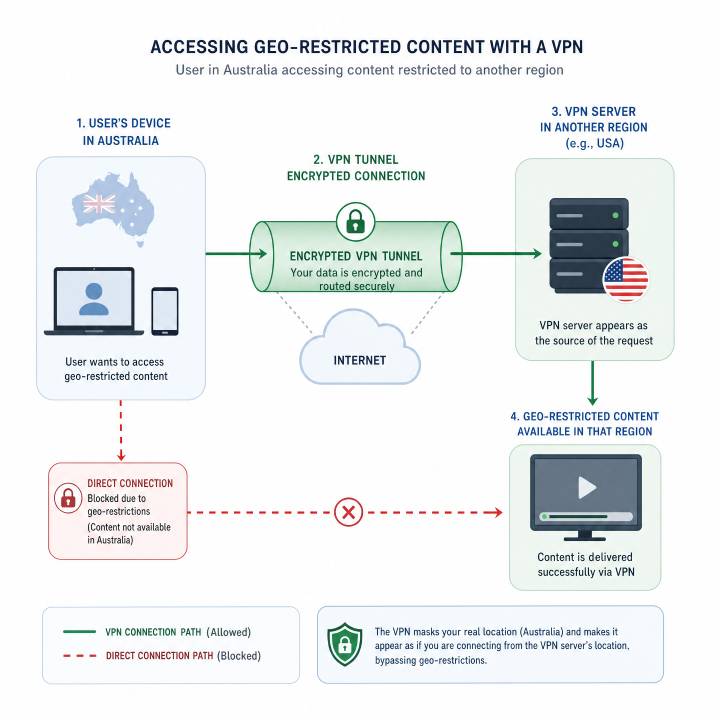 A VPN is a standard app or software you install on your computer, tablet, or smartphone. Its primary job is to create a secure, private connection between your device and the internet.
In doing so, it allows you to temporarily change your digital location, making it look like you are browsing from another country.
How a VPN Works: The "Secret Tunnel" Analogy
Imagine you want to send a letter to a friend, but you don't want the post office to know you are the one sending it, or that you are sending it from Australia.
Instead of mailing it directly, you put your letter inside a locked box and mail it to a trusted partner in the United States. That partner unlocks the box, takes out your letter, puts their own American return address on it, and hands it to the US post office to deliver.
A VPN does this digitally:
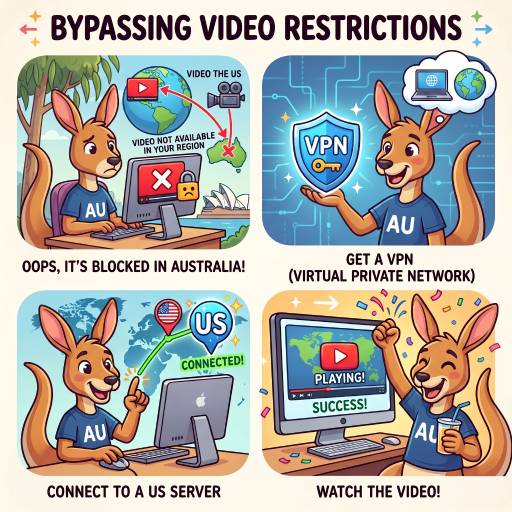
- You choose a location: You open your VPN app and select a country where the video is allowed (like the United States or the UK).
- The "Tunnel" is created: The VPN scrambles your internet traffic (putting it in the locked box) and sends it to a secure server in the country you selected.
- Your location is masked: When your request to watch the video finally reaches YouTube, YouTube only sees the IP address of the VPN's server, not your actual Australian IP address.
- The video plays: YouTube thinks you are physically located in the chosen country, and the video loads normally.
How to Get Started
If you want to watch the restricted videos on this site, here is all you need to do:
- Choose a reputable VPN service: There are many trusted, beginner-friendly providers available (such as NordVPN, ExpressVPN, or Surfshark). Most require a small monthly subscription.
- Download and install the app: Install the VPN app on the device you use to watch videos.
- Connect to a server: Open the app and connect to a server in a country where the video is available (the United States is usually the safest bet).
- Refresh the page: Once the VPN app says "Connected," come back to this website and refresh the page. The video should now play without any issues!